


FAQ
Getting Started6
QWhat kind of game is this?

MetaVersus WISH Online is a 1v1 deck-building card battle game.
During a match, you buy cards from the Market to grow your deck little by little, and you win by using that deck to bring your Rival's HP to 0 or below first.
You can play it in your web browser as well as on PC and mobile.
QHow do I install the game?
Just open it in your web browser and play right away, no installation needed. You can also play on the PC app and mobile app, and we'll let you know in Notices as soon as they're available in the stores.
- When playing in a web browser, we recommend the latest version of Chrome or Edge on PC.
- The screen is designed for 1920×1080 and automatically scales up or down to fit your window size.
QHow do I sign in?
Sign in with your Discord or Google account.
- The game only receives your ID and name. If you sign in with Google, it also receives your email address.
- You enter your password only on the Discord or Google screen, so it is never shared with the game.
- After signing up with one, you can link the other under Settings → Account in 'Sign-in methods'.
- The STOVE PC app signs you in with your STOVE account when you launch it. If the game hasn't seen that STOVE account before, choose 'New game with STOVE' or 'Link existing account'.
QI don't have permission to log in.
MetaVersus WISH Online is still in development, so we're running it as a closed test. Only accounts that have been granted access can get in.
Your account ID appears at the bottom of the screen that blocks your access. Send this ID to our team, and we'll grant you access once we've verified it.
Once we officially launch, everyone will be able to join. Thanks for your patience!
QI want to learn how to play.
The quickest way is to play the Tutorial.
- Tap the DUEL! button in the main lobby.
- Choose Campaign Mode.
- Choose Tutorial.
- Clear the 5 stages in order. Each stage unlocks once you clear the one before it.
| Stage | Rival | What you'll learn |
|---|---|---|
| 1 | Lucius | Goal of the match, Card types, How decks work |
| 2 | Devin | Turn phases, Order of playing cards, Wishing Star |
| 3 | Crimson | Market Card, Strategy for each Duelist, Buying Expensive Cards |
| 4 | Ophelia | Card removal, Card combos, Market sell-outs, The Second Player's Last Turn |
| 5 | Arianna | Win a match on your own, without help |
QI just started the game. What should I do first?
Start with Campaign Mode → Tutorial. Over 5 practice matches, you'll learn the rules one step at a time.
To see what each Stage teaches, check I want to learn how to play.
In the Tutorial, you play as a preset character and can only make the moves the guide tells you to. Convenience settings such as auto-play are also turned off in Campaign Mode.
Once you finish the Tutorial, browse the characters under 'Duelists' in the main lobby, and try other match modes from 'DUEL!'. You start with Devin and Arianna.
Support and Other11
QIs there a spending limit?
Duelists under 18 can spend up to 70,000 KRW per month.
- If you choose a product that goes over your limit, you'll see a notice before you pay.
- Your limit resets on the 1st of every month.
QI'd like a refund (purchase cancellation).
Please send an email to help@metaversus.dev.
- If you bought Jewels less than 7 days ago and haven't used them yet, you can cancel the purchase.
- Even after 7 days, you can still request a refund for unused paid Jewels. In this case, part of the amount may be deducted.
- In your email, please include your nickname, Order ID, payment date, payment amount, and whether your request is a cancellation, a refund or a payment error. You can find your Order ID under Settings → Support → Payments → 'Purchase History'.
QWhere can I see my purchase history?
You can find it under 'Purchase History' in Settings → Support → Payments.
- It shows up to 200 of your most recent orders.
- When you contact us about a refund or a payment, please include the Order ID shown there.
QHow do I buy Jewels?
Go to the Shop → Jewel tab and pick the bundle you want. The payment window will open.
| Product | Price |
|---|---|
| 300 Jewels | ₩3,300 |
| 500 Jewels | ₩5,500 |
| 1,000 Jewels | ₩11,000 |
| 3,000 Jewels | ₩33,000 |
| 5,000 Jewels | ₩55,000 |
| 10,000 Jewels | ₩110,000 |
- Once you complete your payment and return to the game, your Jewels will be added.
- On the web you pay through Xsolla, in the Android app through Google Play, and in the STOVE version through STOVE. Paid Jewels can only be used on the platform where you bought them.
QI'm seeing a "Duplicate login detected" message.
If you sign in to the same account on another device or in another tab, this notice appears on the one you opened first. It can appear even during a match.
- 'To title': Returns you to the login screen.
- 'Retry': If the notice was caused by another tab in the same browser, you can keep playing on this screen, and the other tab will show the same notice instead. If another device signed you out, press 'To title' and log in again. The other device will then be signed out.
QI want to report a Rival with bad manners.
During a match, tap the Rival's Duelist to open the menu, then tap the Report button. You can also report a player with the 'Report User' button on their User Profile.
- Choose a reason, add details if needed, and send your report.
- Our team will review it along with the match records and take action.
QI found a bug in the game.
We're sorry for the trouble. Please report the bug through our Support Desk.
Including the details below will help us find the cause much faster.
- If it happened during a match, which match mode you were playing and which character you were using
- What you were doing when it happened (and whether it happens again if you repeat it)
- A screenshot or video
- Your Account Code (you can copy it from Settings → Account)
QI have a suggestion for the game.
We take suggestions on our **official Discord**.
We read every suggestion you send. Even if it seems minor, feel free to share it!
QThe game freezes or the screen looks broken.
- First, try refreshing the page (F5). If you're using the app, close it and open it again.
- If the problem continues in a web browser, clear your cache and reconnect.
- If it keeps happening in the same situation, please let us know: I found a bug during a game.
QCan I stream this game?
Yes, you can. Feel free to livestream, upload videos and make clips, and monetizing your content is fine too. You don't need to ask for permission.
However, please avoid the following:
- Streams that could be mistaken for the development team or an official channel
- Taking game resources such as art or music and using or selling them elsewhere
- Content that shares abnormal ways to play, such as bugs, hacks or macros
- Content that insults other players or reveals their personal information
- Streams that include sexually explicit, violent or illegal content
If you're unsure, contact help@metaversus.dev. For business inquiries such as collaborations, contact biz@metaversus.dev.
There is also a 'Streamer Mode' that comes in handy while streaming. (Details: What is ‘Streamer Mode’?)
QWhy am I seeing the terms agreement screen again when I log in?
If any of the Terms of Service, Operating Policy or Privacy Policy has been updated, you'll be asked to agree again when you log in, but only to the updated documents. You'll need to agree to keep playing.
Cards and Decks22
QWhat's in my deck at the start?
Your starting deck has Stone (7 cards) + Dagger (3 cards).
QHow many cards are in my hand?
5 cards. You draw 5 cards at the start of a match, and you draw 5 more in the Cleanup Phase at the end of each turn.
QHow many cards can I hold in my hand?
There's no limit. No matter how many extra cards you draw from card effects, you can keep them all.
However, at the end of your turn, any cards left in your hand go to the Discard Pile.
QWhat does '5/2 start' mean?
Your 10-card Starting Deck contains 7 Stone cards and 3 Dagger cards.
If you draw 5 Stones on turn 1, turn 2 gives you the remaining 2 Stones and 3 Daggers. This opening is called a 5/2 start. If you instead draw 2 Stones and 3 Daggers on turn 1, it's a 2/5 start.
The combined chance of getting a 5/2 or 2/5 start is about 1/6.
QWhat happens if my Draw Deck runs short of cards?
Your entire Discard Pile is shuffled to form a new Draw Deck. At that point, every card you've played so far and every card you've bought go into the Draw Deck.
QDo cards leave my deck after I use them?
No. Cards you play or discard go to your Discard Pile and will be drawn again later.
To take a card out of your deck for good, use a card with a Remove effect.
QWhat's the difference between "discard" and "Remove"?
| Where the card goes | Can you get it back? | |
|---|---|---|
| "Discard" | Discard Pile | Yes. It's shuffled back into your Draw Deck later and can be drawn again. |
| Remove | Remove Pile | No. It leaves your deck for good. |
QWhy is it good to Remove cards?
A smaller deck means you draw your good cards more often. Late in a match, starting cards like Stone and Dagger don't help much, so taking them out lets the cards you bought show up in your hand more often. This is called "deck thinning."
QWhat types of cards are there?
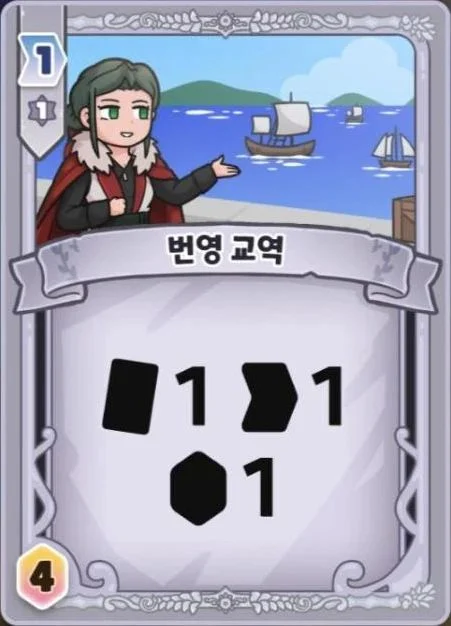
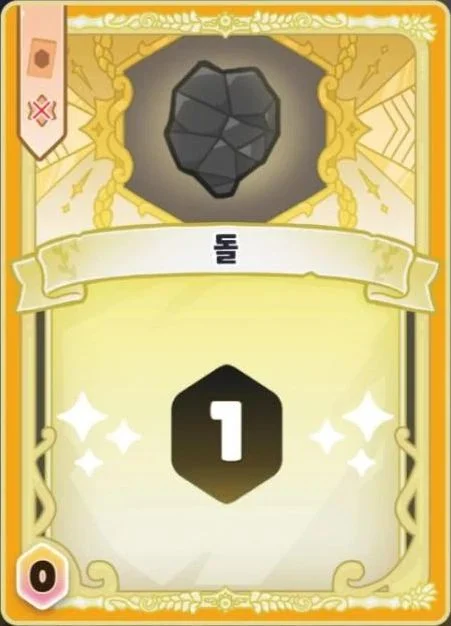
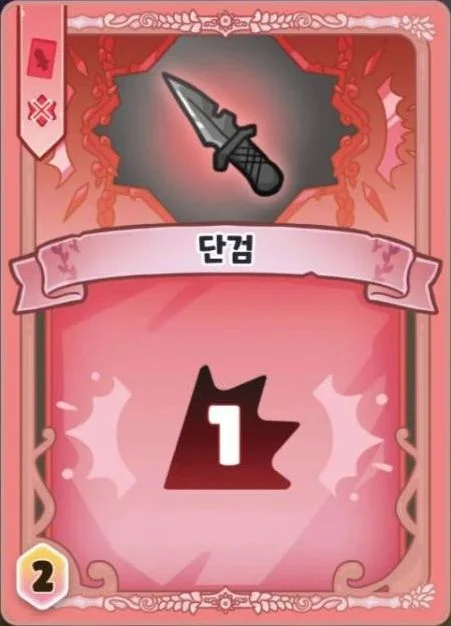
| Type | Card Frame Color | Role | When to Play |
|---|---|---|---|
| Action Card | Gray | Triggers a variety of effects | Action Phase |
| Currency Card | Yellow | Generates Gems (money) | Buy Phase |
| Weapon Card | Red | Deals damage to your Rival | Combat Phase |
QWhy do some card effects say "may" while others don't?
The wording tells you whether an effect is optional or mandatory.
- "May" → Do it only if you want to.
- No "may" → You must do as much of it as you can.
QHow can I see a card's description in a larger view during a match?
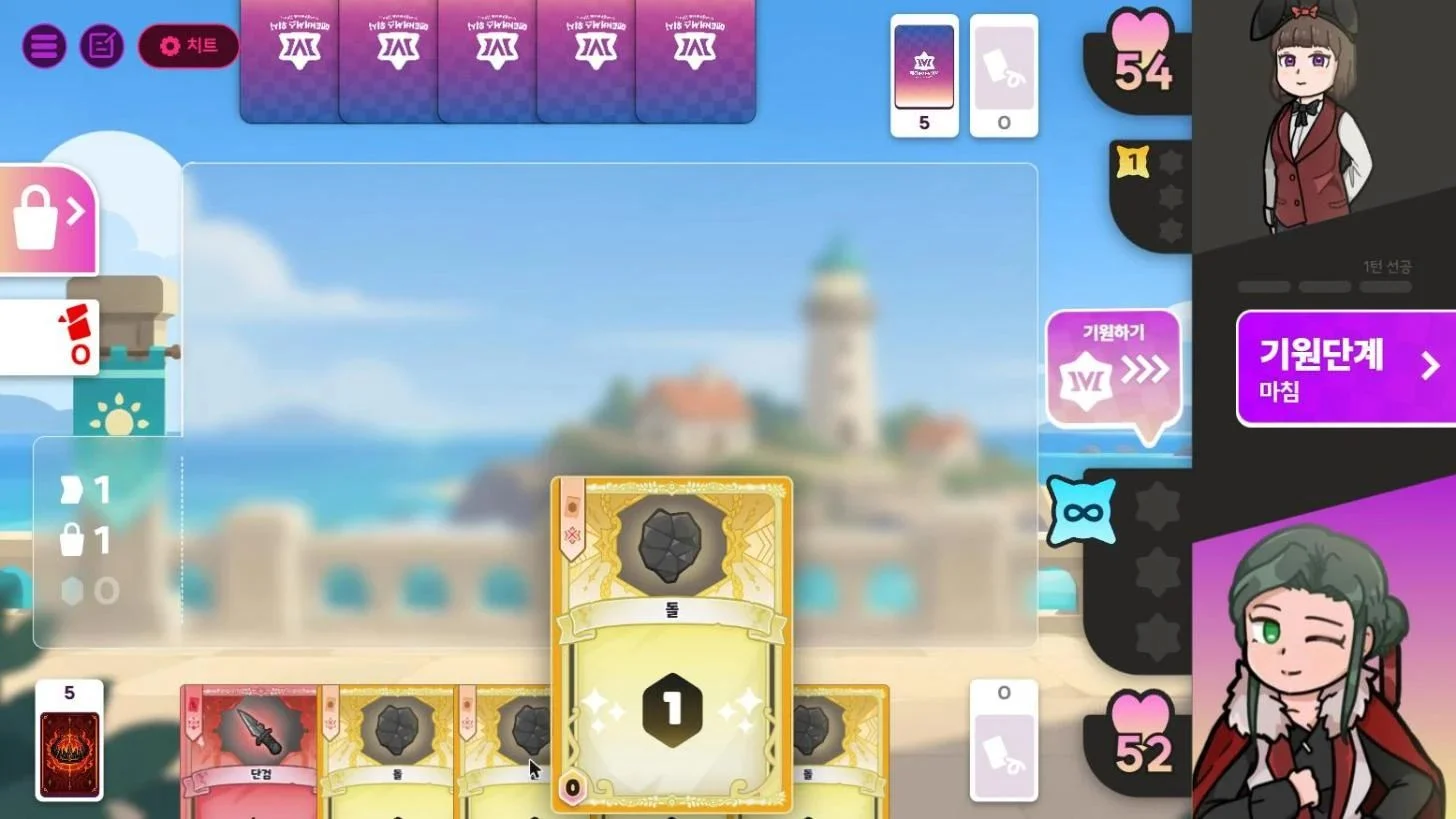
(PC) Hover over a card
Hover your mouse over a card to see an enlarged view of it.
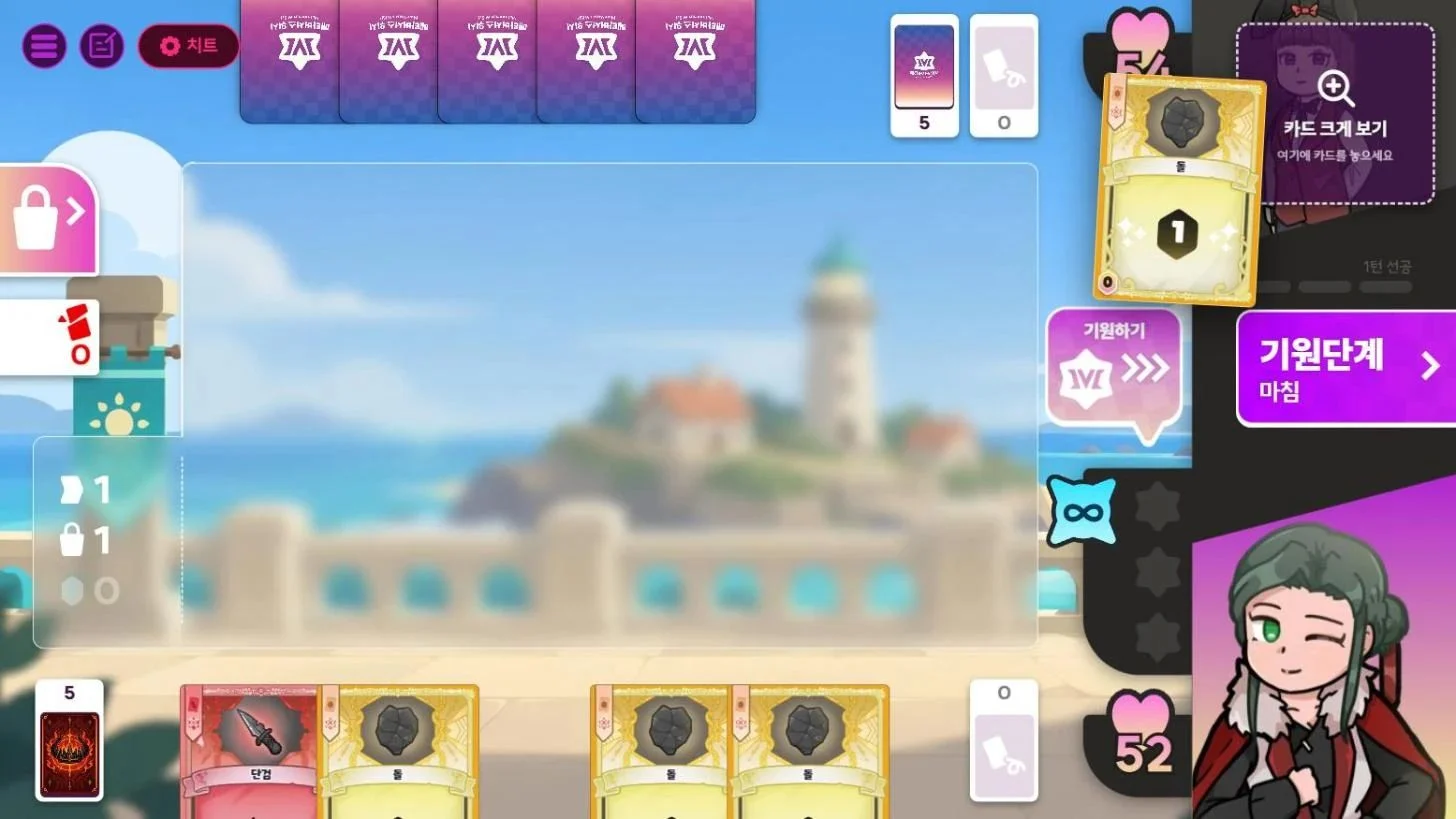
Drag a card to view it in Fullscreen
When you pick up a card, a magnifier slot appears in the top right of the screen. Drag the card onto it to view it in Fullscreen, then tap ✕ in the top right to close it.
QHow can I see a card's Enhanced Effect (a card powered up with a Wishing Star) during a match?
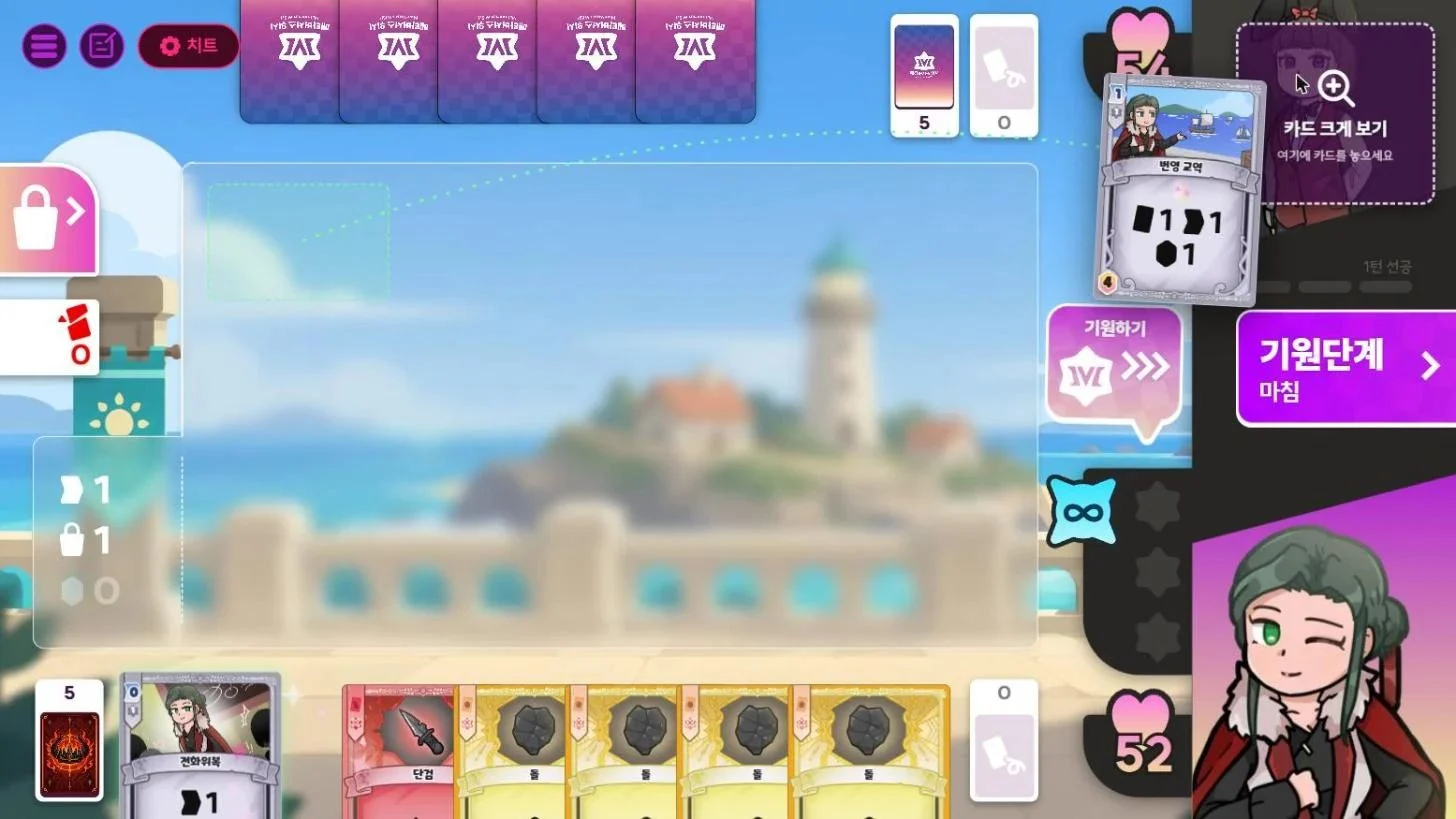
First, open the card in fullscreen. When you pick up a card, a magnifier slot appears in the top-right corner of the screen. Just drag the card onto it.
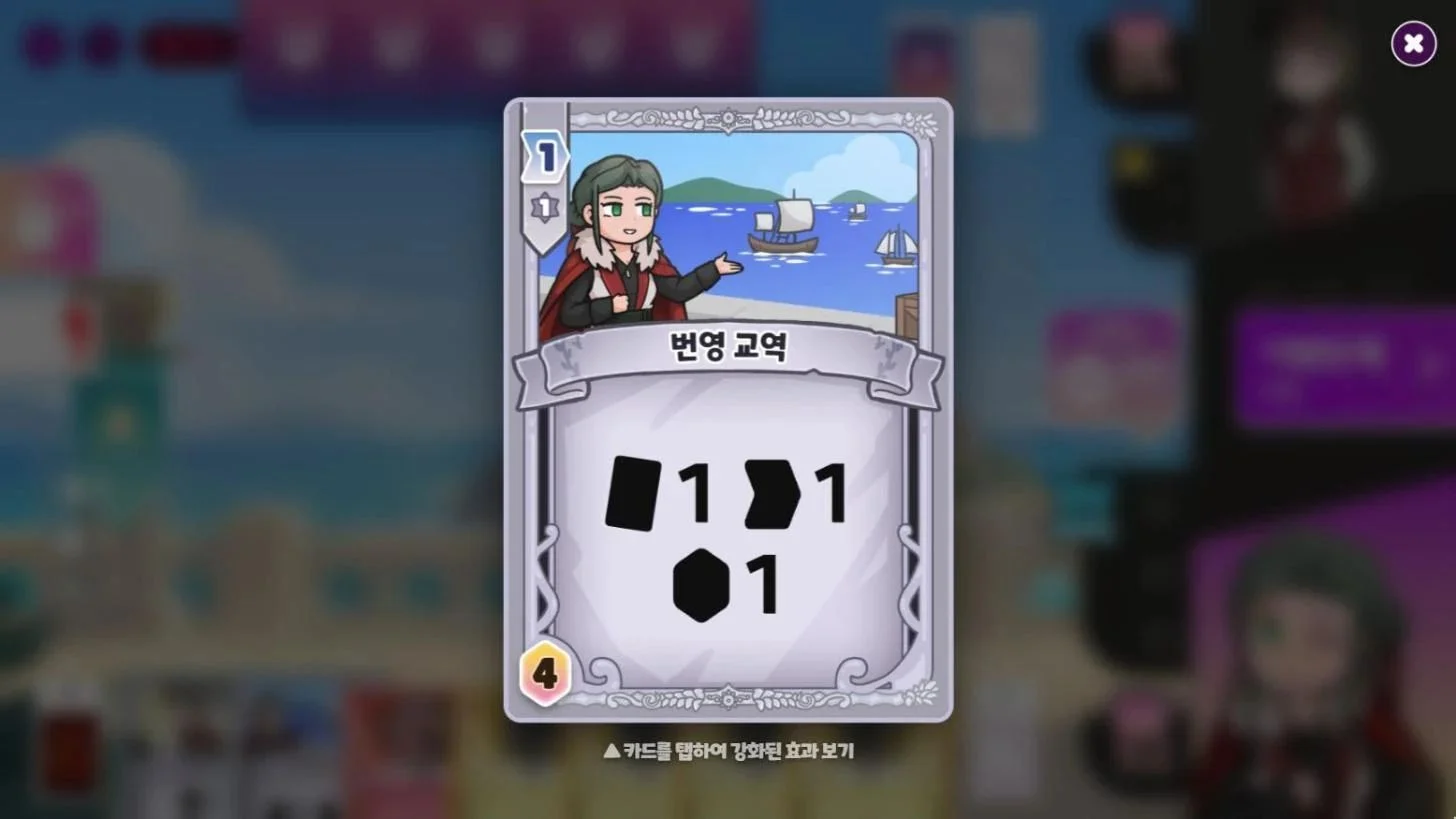
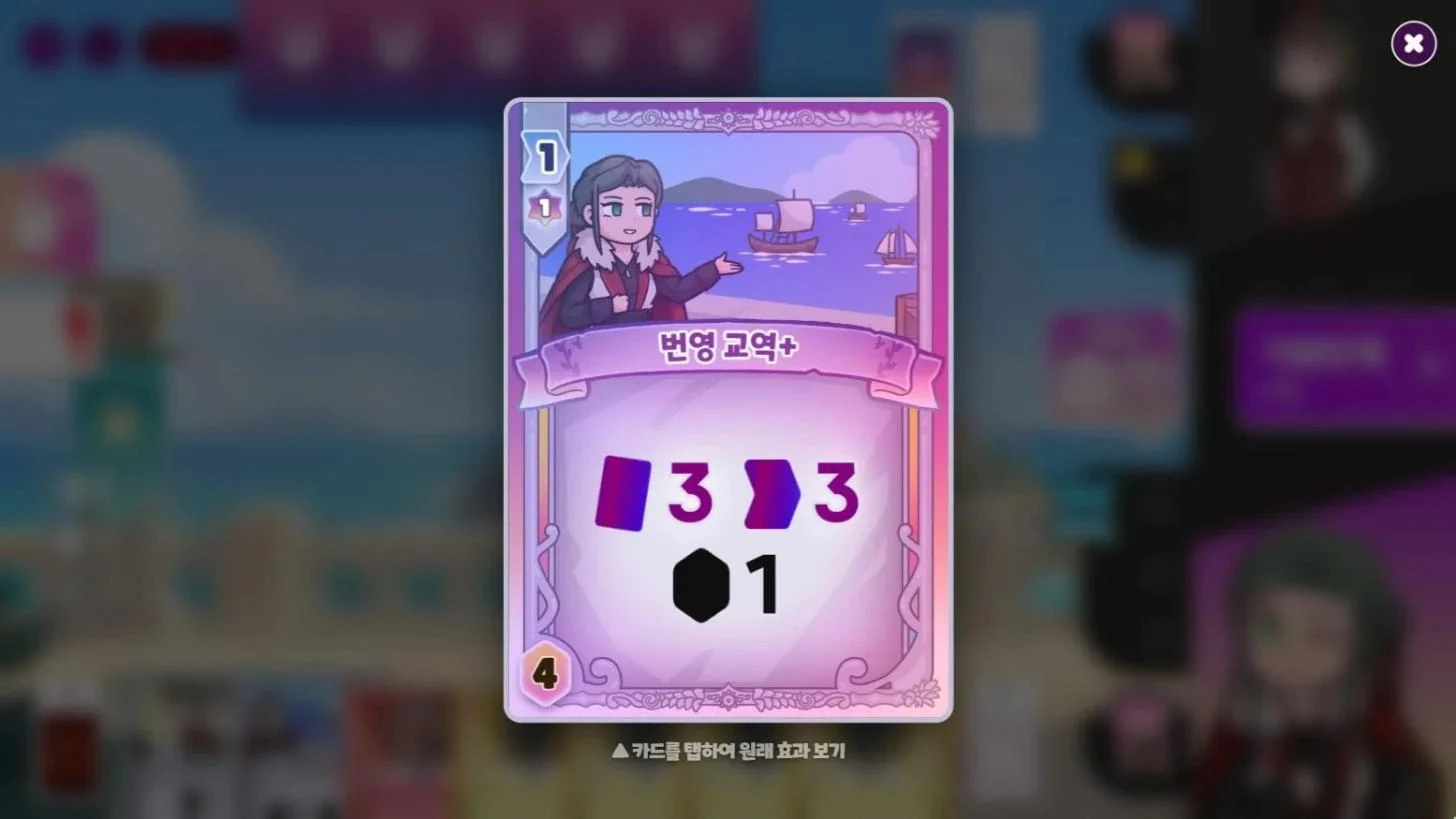
Each time you tap the card in the center, it flips over, switching between its original effect and its Enhanced Effect.
QHow do I get Wishing Stars?
- Choose Wish during the Wish Phase to get 1 Wishing Star.
- However, your turn ends right away. You can't take actions, buy cards, or attack that turn.
- You can also get them from cards that grant Wishing Stars, such as Esoteric Skill, or from Duelist Skills.
You can hold up to 3 Wishing Stars at a time.
QI can't use a Wishing Star on a card.
Check the Star Cost box in the top-left corner of the card. If it shows ✕ instead of a number (1~3), you can't use a Wishing Star on that card. This applies to the cards below.
- Essential Market Cards (Stone, Iron, Gold, Dagger, Longsword, Warhammer)
- Cards you don't buy from the Market, such as non-Market cards
QWhich cards are stocked in the Market?
| Category | Types | Description |
|---|---|---|
| Essential Market Cards | 6 | Always available in every match |
| Neutral Market Cards | 2 | 2 random types out of 15 |
| Your Character's Market Cards | 4 | Chosen by you before the match |
| Rival Character's Market Cards | 4 | Chosen by your Rival |
The lineup may differ in matches with special rules, such as Event Matches.
QWhat are the Essential Market Cards?
| Card | Type | Cost | Effect |
|---|---|---|---|
| Stone | Currency | 0 | Value: 1 Gem |
| Iron | Currency | 3 | Value: 2 Gems |
| Gold | Currency | 6 | Value: 3 Gems |
| Dagger | Weapon | 2 / 3 | 1 Damage |
| Longsword | Weapon | 5 / 6 | 3 Damage |
| Warhammer | Weapon | 8 / 9 | 5 Damage |
QWhy are the Weapon Card (Dagger, Longsword, Warhammer) Costs strange?
For the Dagger, Longsword and Warhammer, the top 3 cards cost 1 Gem more. Whoever buys first pays a little extra, and once 3 cards have been sold, you can buy them at their normal price.
QWhat Neutral Market Cards are there?
There are 15 types of Neutral Market Cards in total, and 2 of them are chosen at random for each match. You can check each card's effect in the Card DB or in the in-game 'Match Mode Guide'.
QWhy do I have to pick 4 types of cards before a match?
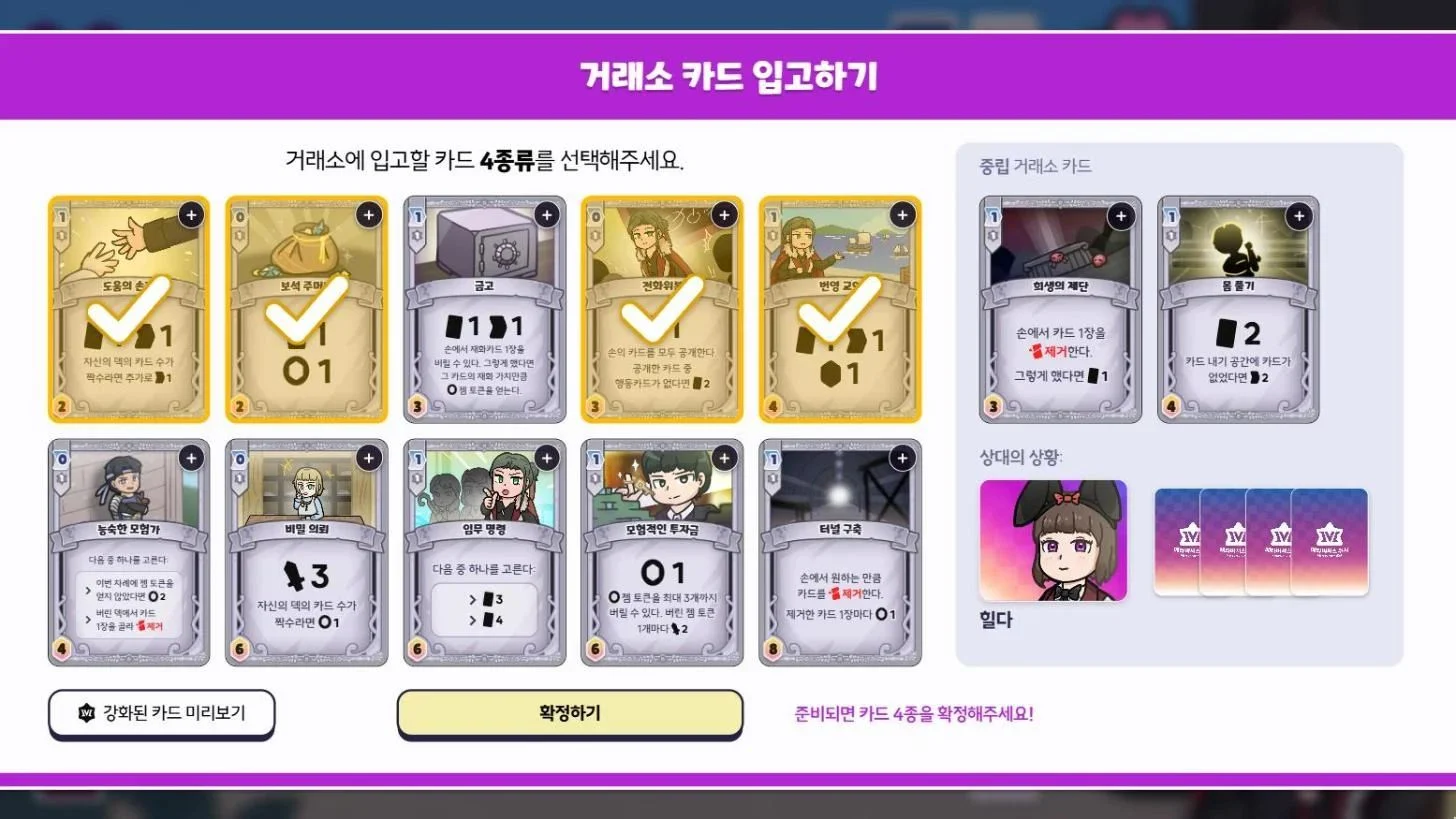
This step is called 'Store Market Cards'.
In this step, you pick 4 types from the cards each Duelist owns (their card pool) and stock them in the Market for this match. During the match, you'll buy these cards from the Market, add them to your deck and play them, so you're really choosing the cards you'll use this match.
While picking, you can also see this information on screen:
- Left: your Duelist's card pool
- Top right: the Neutral Market Cards available this match
- Bottom right: the Rival's Duelist and how many types the Rival has picked
QWhat happens when a card sells out in the Market?
- Neutral Cards and character cards come in stacks of 6 per card type. Once all 6 are bought, that card is sold out and can't be bought anymore. (Effects that give you a copy of a card still work even when it's sold out.)
- A sold-out slot is immediately refilled with 6 copies of 1 new card type, drawn from the same side's card pile.
- For example, if an Ophelia card sells out, another Ophelia card takes its place.
- If there are no cards left in the pile, the slot stays empty.
- Essential Market Cards each have their own stock, and they are not restocked once sold out.
- Stone 10, Iron 20, Gold 20, Dagger 10, Longsword 15, Warhammer 20
QMy Rival bought a Market Card I picked.
Market Cards can be bought by either player, no matter who stocked them.
Your Rival may buy a card you had your eye on before you do, and you can likewise buy your Rival's key card first to keep it out of their hands.
QI bought a Market Card by mistake.
- Sorry, but actions can't be undone once they're made.
- If this happens often, try changing Settings → Convenience → Market card purchase controls to Double tap or Hold. This makes accidental purchases less likely than with the default tap setting.
Game Rules28
QWhat is Bond?
Bond shows how close you've grown to a character. Only characters you've unlocked can build Bond.
- You gain Bond by winning Ranked Matches or Event Matches with that character. Your first win of the day gives 5, then each win after that gives 4, 3, 2 and 1, for up to 15 per day. Raising your VIP level gives you more Bond for each win.
- Gifting food gives a big Bond boost. To make food, draw ingredients with Powder and cook them. Each character accepts only their two favorite foods: their favorite gives 100 Bond, and their second favorite gives 85. You can give each character 1 gift, or 2 at VIP 3 and 3 at VIP 6. Once you've used them up, they all refill 8 hours after your first gift. A Digestive from the Shop refills that character's gifts right away.
- As your Bond grows, your Bond Rank goes up, and each rank rewards you with lobby lines, Emotes and Card Backs.
- To check it, choose a character under 'Duelists' in the main lobby, then open 'Bond'.
QWhat is Mastery?
Mastery is a growth stat that each character builds up separately. It goes up when you complete missions with that character.
- There are three kinds of missions: Win Missions (total wins), Combo Missions (card combos), and Challenge Missions.
- Only Ranked Matches played with an unlocked character count.
- As Mastery builds up, your Mastery Rank rises in the order D → C → B → A → S → Z, and each rank rewards you with Account EXP and profile pictures.
- In the main lobby, open 'Duelists', pick a character, then check your progress and claim your rewards under 'Mastery'.
QWhat are the Event Match rewards?
Each win earns you Event Medals.
- In each round, your first win gives 180 medals and your second and third wins give 10 each, for up to 200 in total. Medals are added the moment you win.
- You can trade medals in the 'Exchange Shop' in the Event Match lobby for Titles, Profile Pictures, Emotes, Powder, Gacha Coins and Trial Tickets.
- Limited-time Cosmetics are only sold during their season.
- The Exchange Shop closes between seasons.
QWhen is the Event Match open?
It runs every week from Friday 6 PM to Monday 5 AM (KST).
- Matchmaking for new matches closes at 4 AM on Monday.
- You can join from Account Level 3.
- The special rules change with each round. You can check the current rules in the Event Match lobby.
QHow do I claim Ranked Rewards?
Claim them yourself from the 'Rewards' screen in the Ranked Match lobby.
- Monthly Rewards: All rewards up to the highest Tier you reached that month (Powder, Trial Tickets, Gacha Coins) are unlocked. You can claim them starting from Trainee.
- Season Rewards: You receive Cosmetics based on the Tier you reached during the season.
- Any unclaimed Monthly Rewards are sent to your Mail at the end of the month. This mail disappears after 7 days.
QWhat are Tiers and Trophies in Ranked Match?
Trophies are a score that reflects your skill, and your Tier shows how far you've climbed that month.
Trophies
- You start at 1,000 Trophies. Win and they go up, lose and they go down.
- They carry over when the month changes.
Tier
- Beginner → Trainee → Rookie → Minor 1, 2 → Major 1, 2 → Pro 1, 2, 3 → Master
- Each Tier has a set number of wins to rank up, and you rank down after a set number of losses (Set Record).
- From Minor 1 onward, reaching the required wins makes your next match a 'Promotion Match', and reaching the loss limit makes your next match a 'Relegation Match'.
- You can't rank down from Beginner through Rookie, and Master can't rank up or down any further.
Season
- A season lasts 3 months. Your Tier starts over from Beginner every month.
- As a comeback bonus, each win counts as 2 wins until you reach one Tier below your highest Tier from last month (up to Major 2).
QHow do I play Ranked Match?
Go to DUEL! in the main lobby, choose Ranked Match, and search for a Rival. You'll be matched with a Duelist of similar Tier and Trophies.
- Entry Condition: You need to own at least as many characters as the number of candidates for your Tier, or have a Trial Ticket.
- Candidates & Bans: The higher your Tier, the more candidate characters you pick (1 to 5). Each player bans from the Rival's candidates, then you choose which character to deploy from those remaining.
- For more detailed rules, see the 'Ranked Match Guide' in the game.
QWhat's the difference between the First Player and the Second Player?
- First Player: If both players have the same HP when the match ends, the First Player wins.
- Second Player: Taking a lethal hit (0 HP or less) doesn't mean an instant loss. You get one more Last Turn, and then the match ends.
QWhat is a ‘Fatal Blow’?
A Fatal Blow is when a character's HP drops to 0 or below, or the Damage that brings their HP to that point.
QWhat is the 'Last Turn'?
It's one final turn the Second Player gets after taking a lethal hit.
During the Last Turn, the HP display changes to show what you need to turn things around on that turn.
QCan a match end in a draw?
No. If both players end with the same HP, the First Player wins.
- If a match reaches turn 30, whoever has more HP when the Second Player's turn 30 ends wins by Decision Win. If HP is still tied, the First Player wins.
QWhat is a ‘character’?
A character is who a Duelist (Player) brings into a match.
Each character differs in the following ways:
- Max HP
- Included Cards: cards unique to that character that can be stocked in the Market
- Skill: an ability only that character can use
- Play Style: the strategy the character uses to win
QWho are the Duelists?
As of November 2026, there are 25 Duelists.
You can see all of them on the Duelists page or under 'Duelists' in the game's main lobby.
QHow do I use Skills?
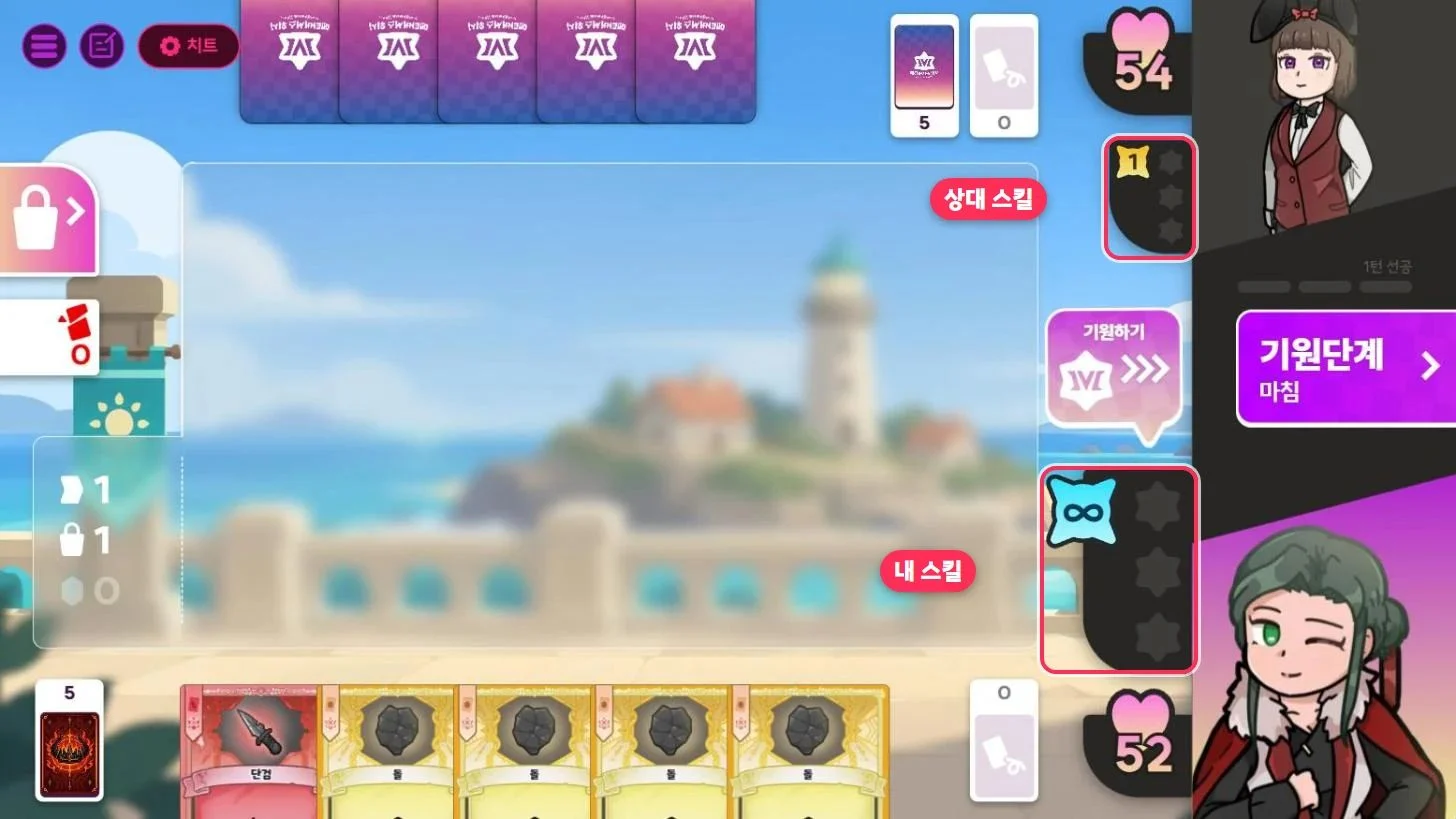
- How you use a Skill depends on its type.
- Active (orange): Tap it to cast it yourself.
- Passive (light blue): Casts automatically when its requirements are met.
- Condition: Some Skills have a Condition. You can only cast them once the Condition is fulfilled.
The match screen shows how many casts you have left, so keep an eye on it as you play.
QWhat is a Trial Ticket?
- A Trial Ticket is an item that lets you play a match with a character you haven't unlocked yet.
- Each ticket gets you one match with that character, and you can use it on any character.
- There are two kinds of Trial Tickets.

Daily Trial Ticket
- Refills to 3 every day at 00:00 (KST).
- Cannot be purchased.

Trial Ticket
- You can hold up to 99.
- Earn them as Event rewards or buy them with Powder in the Shop.
- The Shop offers:
- Once a day: 2 for 200 Powder, 4 for 400 Powder
- Once a week: 5 for 490 Powder, 10 for 980 Powder
- You don't need a ticket in these cases:
- In a Private Match, when your Rival owns that character (Lending Duelists), or when the Host has a Friendly Master Key
- When playing in the Battle Lab
When are tickets used?
- Daily Trial Tickets are used first. If you run out, regular Trial Tickets are used.
- Ranked Match: 1 ticket when you lock in a character you haven't unlocked
- Event Match: if you search for a match with a locked character, 1 ticket once a Rival is found
- Private Match: 1 ticket, only if neither you nor your Rival has that character
- Battle Lab, Campaign Mode: No ticket needed. (Campaign Scenarios can only be played with unlocked characters, and the Tutorial and Mastery use set characters.)
- If the match doesn't start or ends within 3 turns, the ticket you spent will be returned.
QWhat match modes are there?
| Mode | Type | Description |
|---|---|---|
| Ranked Match | Competitive | Compete for Tier and Trophies. |
| Event Match | Competitive | Compete under special rules every weekend. (Unlocks at Account Level 3) |
| Private Match | Friendly | Invite friends with a Room code and play against them. |
| Campaign Mode | Solo Modes | Play against the AI in three tracks: Tutorial, Mastery, and Scenario. |
| Battle Lab | Solo Modes | Practice against the AI and change the conditions however you like. |
Press the DUEL! button in the main lobby to choose a match mode. Contest Match under Friendly is coming soon.
QHow do I play against a friend?
In Match mode, choose Private Match.
- The host taps 'Create Room', chooses the Room Settings, and creates the room.
- Share the Room code shown in the top left of the room lobby with your friend.
- Your friend enters the 5-digit room code in 'Join Room' and taps 'Find'.
The host can change the Room Settings with 'Open settings' in the lobby, and the Guest can view them with 'Details'. You can set the following:
- Preset: Casual Rules, Competitive Rules, Custom
- Turn Time Limit, Turn limit, Inactivity warning limit
- First Player for the first match, First Player from the next match on
- Whether selected Duelists are revealed, Duelist Selection
- Handicap: Max HP Adjustment, start with a Wishing Star, show all cards in hand
QAre Private Match results recorded?
Yes, they are. You can view them by selecting 'Private Match' under 'Recent matches' in your User Profile. They don't affect your Trophy count or Tier in Ranked Match.
'Record in this room' in the room lobby shows only the matches played in that room, so it disappears once you leave the room.
QWhat is the "Standard Time Limit"?
It's the default time limit used in most matches.
- Turn 1: 120 sec.
- From Turn 2: 30 sec. per turn, plus a 70 sec. time bank shared across the entire match
- The 30 seconds reset at the start of each turn.
- Once your 30 seconds run out, your time bank starts counting down. The time bank does not refill during a match.
- When time runs out, you immediately move to the Cleanup Phase, your turn ends, and you receive an Idle warning. Any remaining time bank is also set to 0.
QWhat are "Idle warnings"?
You get a warning when you don't finish your turn within the time limit. Once you have 2 warnings, you're treated as away from the game and the match ends in a Forfeit loss.
- If you run out of time on turn 1, you get 2 warnings at once and lose by Forfeit immediately.
- From turn 2 onward, you get 1 warning each time you run out of time.
- Finishing a single turn within the time limit resets your warnings to 0.
- In a Private Match, the warning limit can be changed in Room Settings, and some Event Match rules use a different limit as well.
Note: if you get several Forfeit losses in Competitive within a short period, your access to Competitive will be restricted.
QWhat are the Cheat Settings in the Battle Lab?
The Battle Lab is a mode where you play against AI and freely change conditions in the arena to study strategies. During a match, you can use the following cheats.
- Resource Control
- Keep Gems, Action Points and Buys at 99 at all times
- Use skills up to 99 times
- Draw a card each time you tap the Draw Deck
- Fully restore HP, or take damage down to 1 HP
- Gain a Wishing Star instantly
- Change deck and hand
- Build a deck with any cards you want (up to 99 copies of each), swap out your hand, and clear the Remove Pile
- Market controls
- Lock stock at 99 cards, restock with newly stored cards, and set Cost to 0 Gems
- Remove the top 3 Weapon cards that cost 1 Gem more
- Arena controls
- Choose the First Player
- Turn Time Limit (Default, 180 sec., Unlimited)
- Turn limit (10, 20, 30, 40 turns, Unlimited)
- Continue the match even when HP drops to 0 or below
- Change the Rival's Duelist (3 times per match), adjust Rival difficulty, and toggle Coach messages
QHow do I surrender?
During a match, open the Menu in the top left and tap 'Surrender'. The match will end as a Surrender Loss.
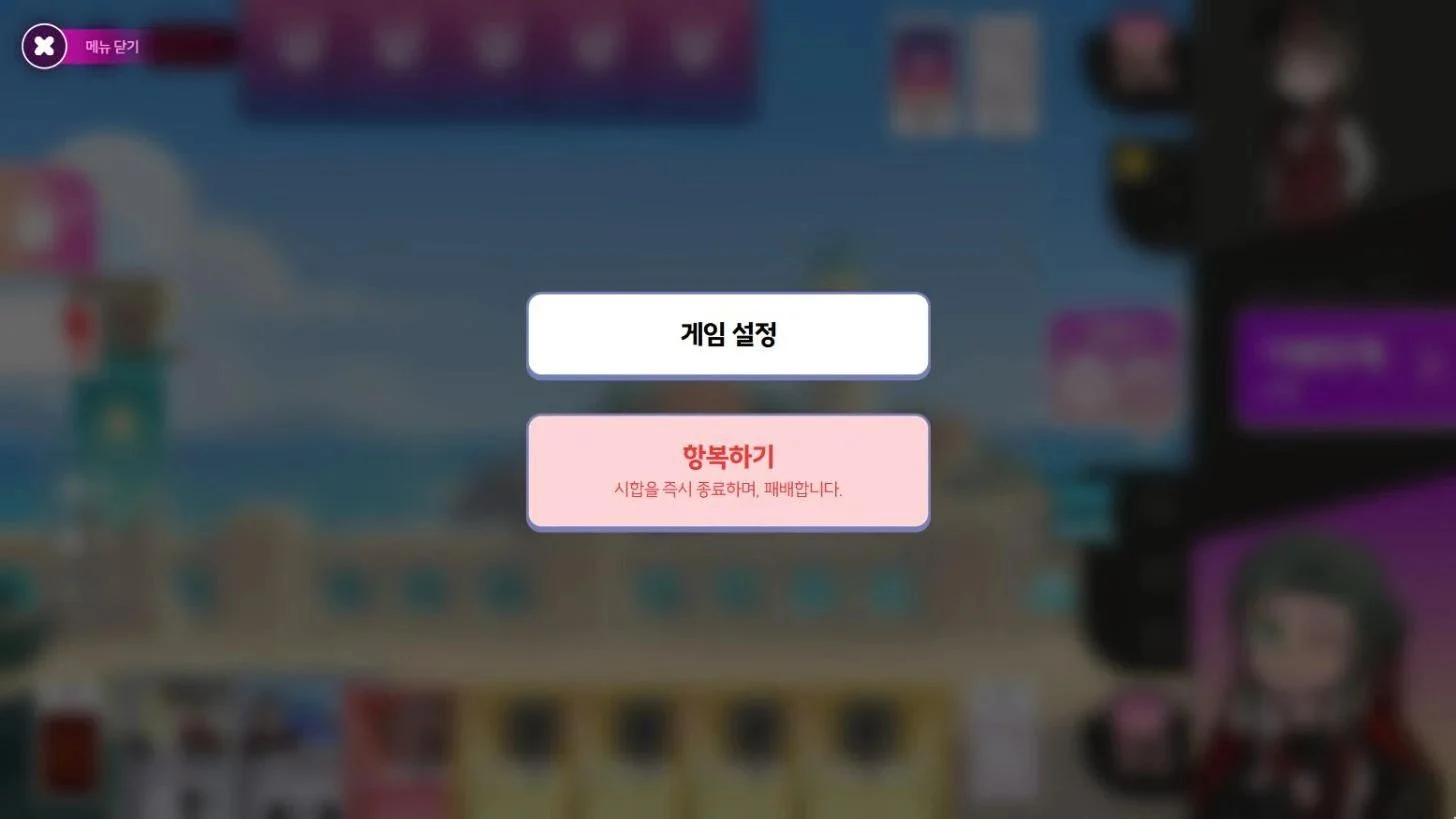
Note: If you surrender within 5 turns in Ranked Matches and Event Matches repeatedly over the last 24 hours, surrendering will be restricted. 3 times results in a warning, 5 times blocks your next Surrender in Competitive matches, and 8 times blocks your next 5 Surrenders.
QI don't have enough time. Can the time limit be extended?
You can't extend it in Ranked Matches, but in Private Match and Battle Lab you can set the time limit to 'Unlimited'.
- Private Match: The Host sets it under 'Turn Time Limit' in Room Settings.
- Battle Lab: Set it with 'Set the turn time limit' in Cheat Settings. It is set to Unlimited by default.
QI can't join Ranked Match. (Competitive Restrictions)
If any of the following happens repeatedly in Competitive play, you are automatically restricted. While a restriction is active, the notice window shows the time left.
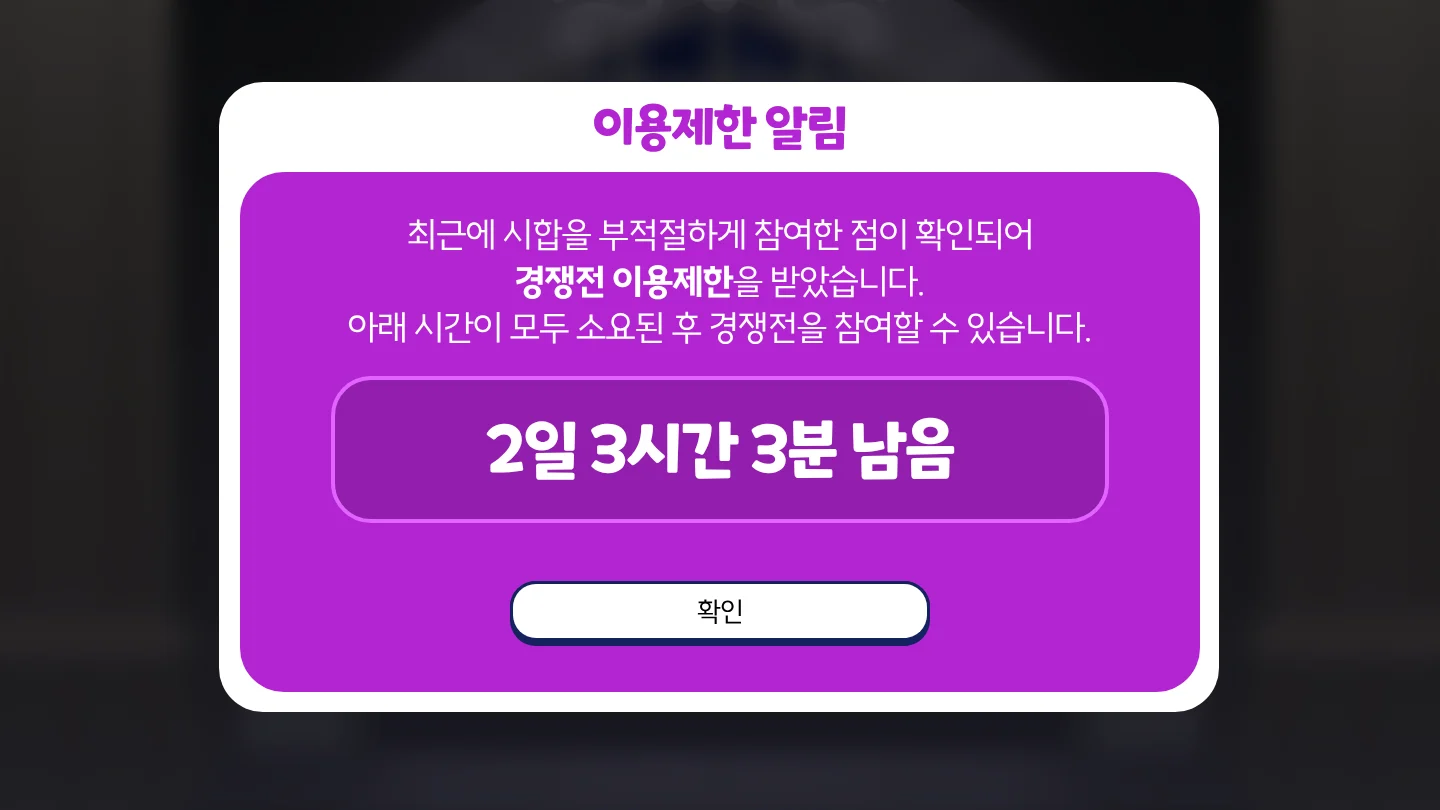
- 3 Forfeits in the last 24 hours: 10 minutes. 4 Forfeits: 1 hour. 5 Forfeits: 3 days.
- 5 matches put on hold in the last 7 days because the results didn't match: 1 day. 10 matches: 3 days.
- 5 matches in the last 7 days where you didn't submit a Trial Ticket: 1 day. 10 matches: 3 days.
If you surrender within 5 turns too often, surrendering will be restricted ( I want to surrender.).
Sanctions issued directly by the operations team can be found under 'Restriction History' in Settings → Account.
QHow do I use in-match items (Rewind Pocket Watch, Star Box, Health Potion)?
These items can only be used on Normal difficulty in the campaign Scenario. During a match, tap the Bag button at the bottom right of the arena to open the item slots, and tap it again to close them. You can use them whenever you're not in the middle of an action.
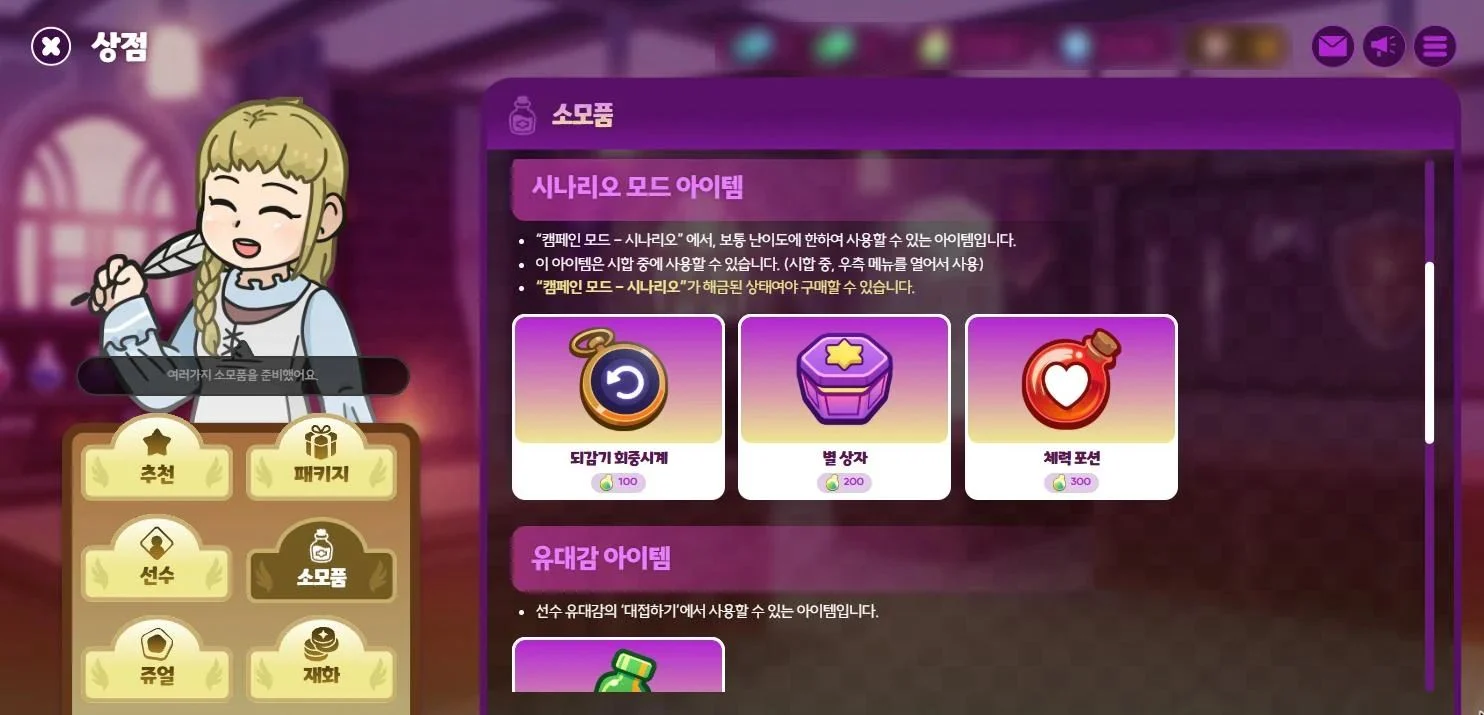
- Rewind Pocket Watch: Undoes your last action. Usable up to 3 times per match.
- Star Box: Instantly gain 1 Wishing Star. Usable up to 2 times per match.
- Health Potion: Instantly gain 10 HP (up to your Max HP). Usable once per match.
You can buy them with Powder under 'Scenario Mode Items' in the Shop → Consumable tab (Pocket Watch 100, Star Box 200, Health Potion 300). Only accounts that have unlocked the Scenario can purchase them.
QWhat is Grit?
Grit is an item used to start Campaign Scenario matches. Each match you start costs 1 Grit. The Tutorial and Mastery don't use Grit.
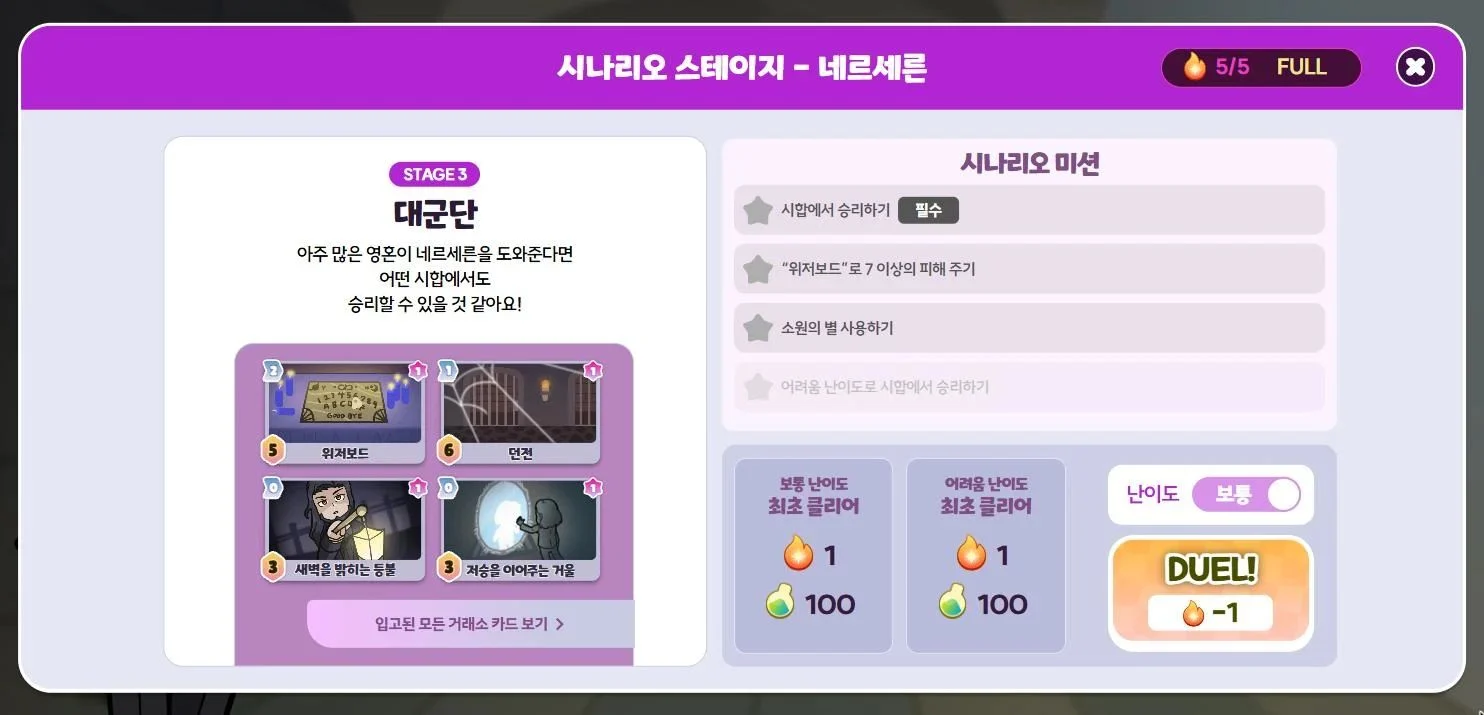
- Grit refills by 1 every 2 hours, up to 5. Your VIP tier can raise this cap to 8. First Clear Rewards and Powder refills can take you past the cap.
- You can also refill instantly with Powder. Depending on how many times you've refilled that day (resetting at 5 AM), it costs 50, 100, 200, 400, or 800 Powder.
- Clearing a Stage for the first time gives you 1 Grit and 100 Powder.
- If you Surrender within 3 turns, the Grit you spent is refunded. This works up to 3 times a day.
QHow do I unlock Scenario in Campaign Mode?
It unlocks once Mastery is unlocked (Clear Tutorial Stage 5) and you have unlocked 5 or more characters.
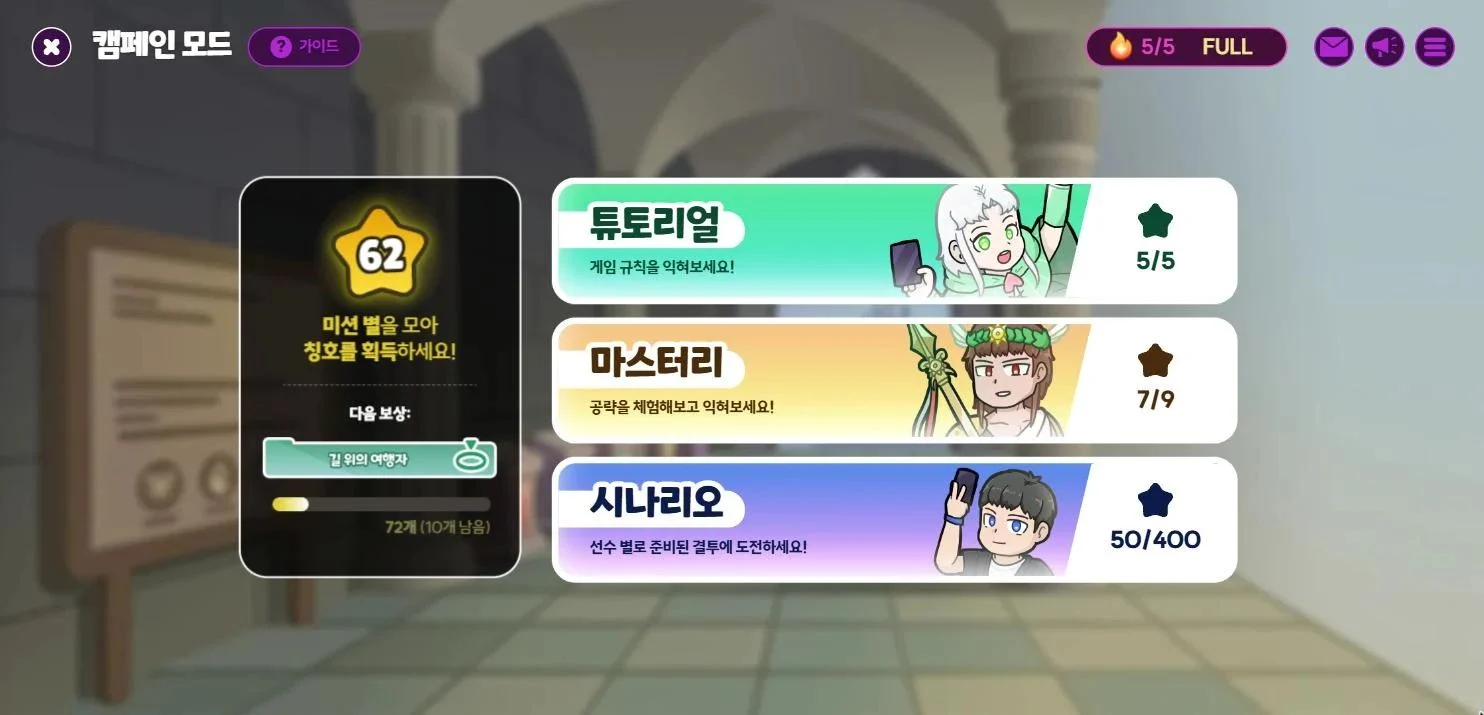
- Each character you unlock has 4 stages, and all of them are open from the start.
- Each stage has missions, and you earn a star for each one you complete. Collect enough stars to earn Titles.
- Clear all 4 stages for a character to unlock that character's Hard difficulty.
- Each match costs 1 Grit to start.
QWhat is Mastery in Campaign Mode?
Mastery is a set of practice stages where you learn one strategy per match. There are 9 slots, each with a set theme such as 'Strike Fast' or 'Build Resources'.
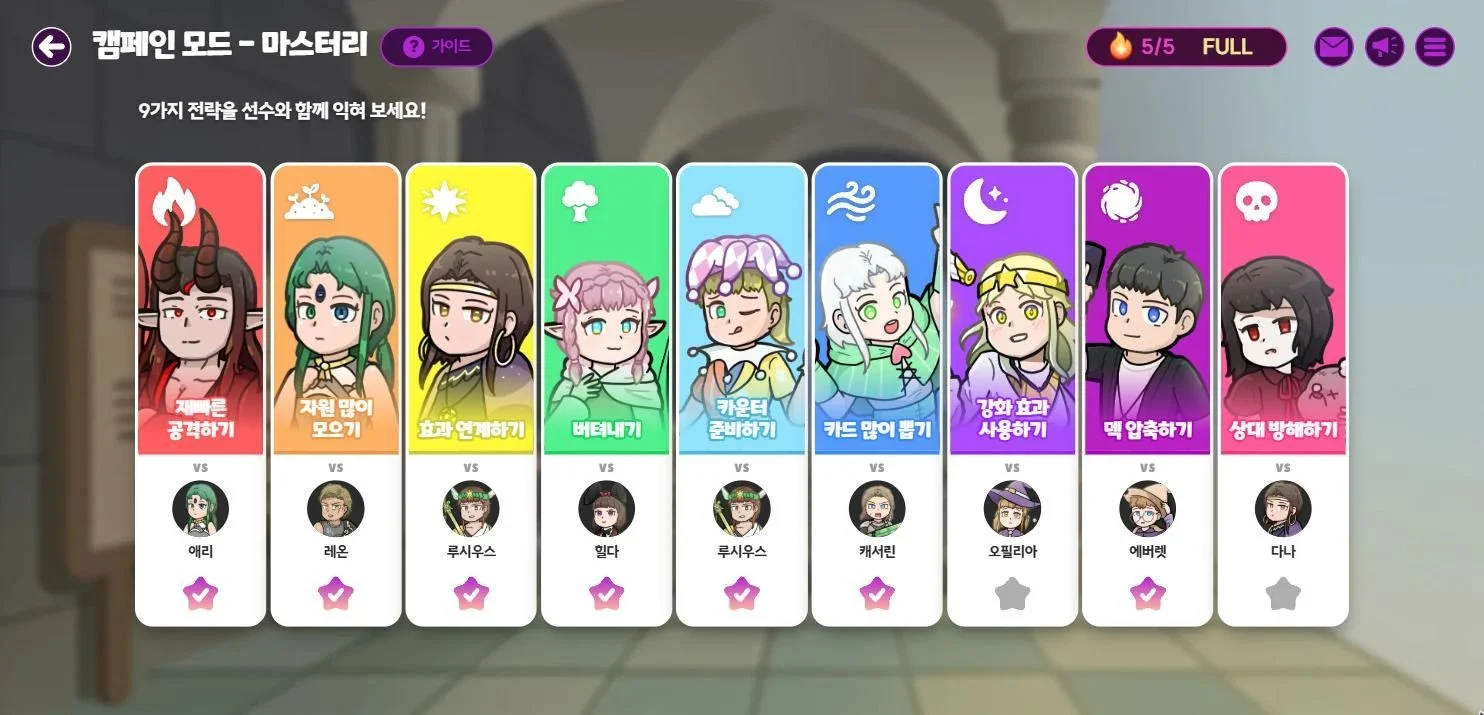
- All 9 slots unlock at once when you clear Tutorial Stage 5.
- Each slot has you play one match against the AI with an assigned Duelist. You can play even if you haven't unlocked that Duelist, with no Trial Ticket needed, and it doesn't use any Grit.
- Win to earn 1 star for each slot.
Settings and Controls12
QHow do I use Emotes during a match?
Tap the 💬 button at the bottom right of the match screen to send any Emotes you've equipped in Cosmetics (up to 9).
- After sending an Emote, you can send another after 3 seconds.
- Tapping 'Turn off Emotes' turns off both sending and receiving, and they stay off in your next match too.
- The Emote window closes when the time left on your turn drops below 30 seconds.
QWhere can I change my Cosmetics?
You can change them from 'Cosmetics' in the main lobby. Here's what you can change:
- Profile Picture, Profile Frame, Card Back, Title, Emote, Arena Backdrop, Hit Effect, Duelist Skin
QPlaying cards one at a time is tedious.
During the Buy Phase and Combat Phase, you can use the 'Play All Cards' button to play all your Currency Cards or Weapon Cards at once.
- If even pressing a button feels like a hassle, go to Settings → Convenience and turn on 'Auto-advance during a match'. It will play them all for you automatically.
QHow do I view the Match Log?

Tap the Match Log button on the match screen or the match results screen. You can see everything that has happened so far in order, including cards played, damage dealt, and purchases.
QCan I change the hand sorting?
Yes. Go to Settings → Convenience → Hand Sorting to choose the order of the cards in your hand.
- By type: Action Card → Currency Card → Weapon Card → Other
- By Action Card AP Cost, lowest first
- By Cost, lowest first
QThere's no sound.
- Make sure Music and Sound Effects are turned on in Settings → Sound.
- If you're playing in a web browser, check that the tab isn't muted.
- In some browsers, sound only starts after you click the screen once.
QHow do I adjust the sound?
You can adjust it in the Settings → Sound tab.
- Music: Turn it on or off with the ON/OFF toggle, and set the volume with the slider.
- Sound Effects: Adjust these the same way as Music.
- You can also turn off just the Crowd roar on its own.
QThe game runs slowly. Can I reduce the visual effects?
Yes. In Settings → Graphics, you can set each of the two options below to Normal, Simplified, or Minimize.
- Motion settings: screen movement effects
- Effect settings: Hit Effect, sparkle effects, and more
When you first log in, these are set automatically based on your device. PC starts at Normal, mobile at Simplified, and low-spec mobile devices at Minimize. Any changes you make yourself are kept.
QThe controls feel tedious. Can I automate them?
Go to Settings → Convenience → 'Auto-advance during a match' and turn on any of the options below.
- Play all Currency Cards in the Buy Phase
- Play all Weapon Cards in the Combat Phase
- End the Action Phase if you have no Action Cards to play
- With a 5/2 start, Wish in the Wish Phase on the turn you get 2 Gems
- Skip ahead after 1 second if there's nothing to do in the Buy Phase or Combat Phase
These settings don't apply in Campaign Mode.
QWhat is ‘Streamer Mode’?
It's a feature that protects streaming Duelists from 'sniping', where players deliberately queue for a match at the same time to land against someone who is live.
You can turn it on in Settings → Convenience → Anti-sniping settings → Streamer Mode.
QThe screen is cut off or looks too small.
The game screen is designed for 1920×1080 and scales up or down automatically to fit your window. If the screen looks wrong, check the following.
- If you're playing in a web browser, maximize the window.
- If you're playing in a web browser, press Ctrl + 0 to reset the zoom to 100%.
- On wider screens, it's normal for more space to show on the left and right sides.
QWhere can I change my Duelist Skin?
You can change it from the 'Duelist Skin' tab under 'Cosmetics' in the main lobby, or with the 'Duelist Skin' button on the Duelists screen.
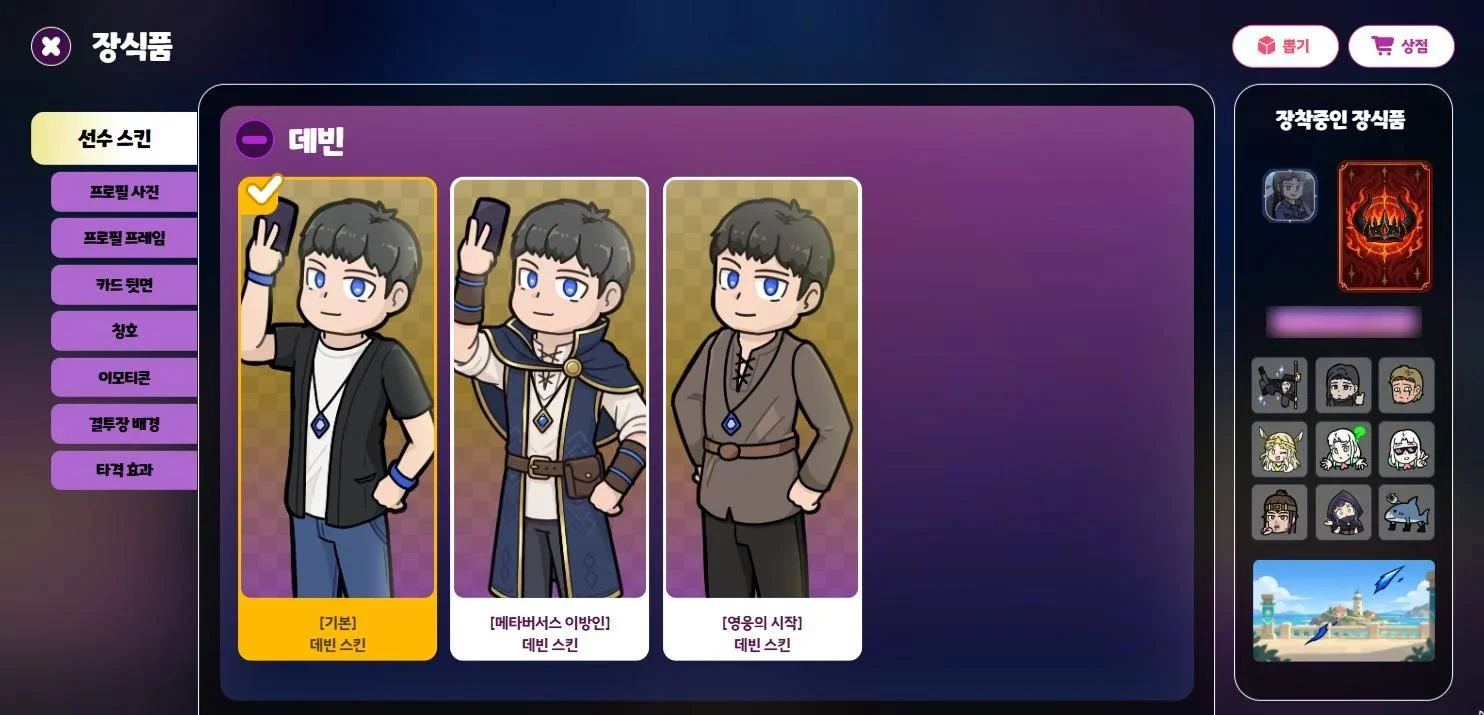
- Equipping a skin changes the character's artwork and voice lines in the lobby, match cut-ins, and the results screen.
- You can equip any skin you own, even if you haven't unlocked that character yet.
- Skins are obtained from the Cosmetics Gacha.
Systems12
QHow long can I keep my mail?
Some mail has an expiration date.
- In your Mailbox, it shows as 'Expires in N days.' Once that time is up, the mail disappears and can no longer be claimed.
- Be sure to collect it in time with 'Claim reward' or 'Claim all mail rewards.'
QHow do I change my nickname?
Buy a Nickname Changer from Account in the Shop → Consumable tab, then tap 'Use' in your Bag to change it.
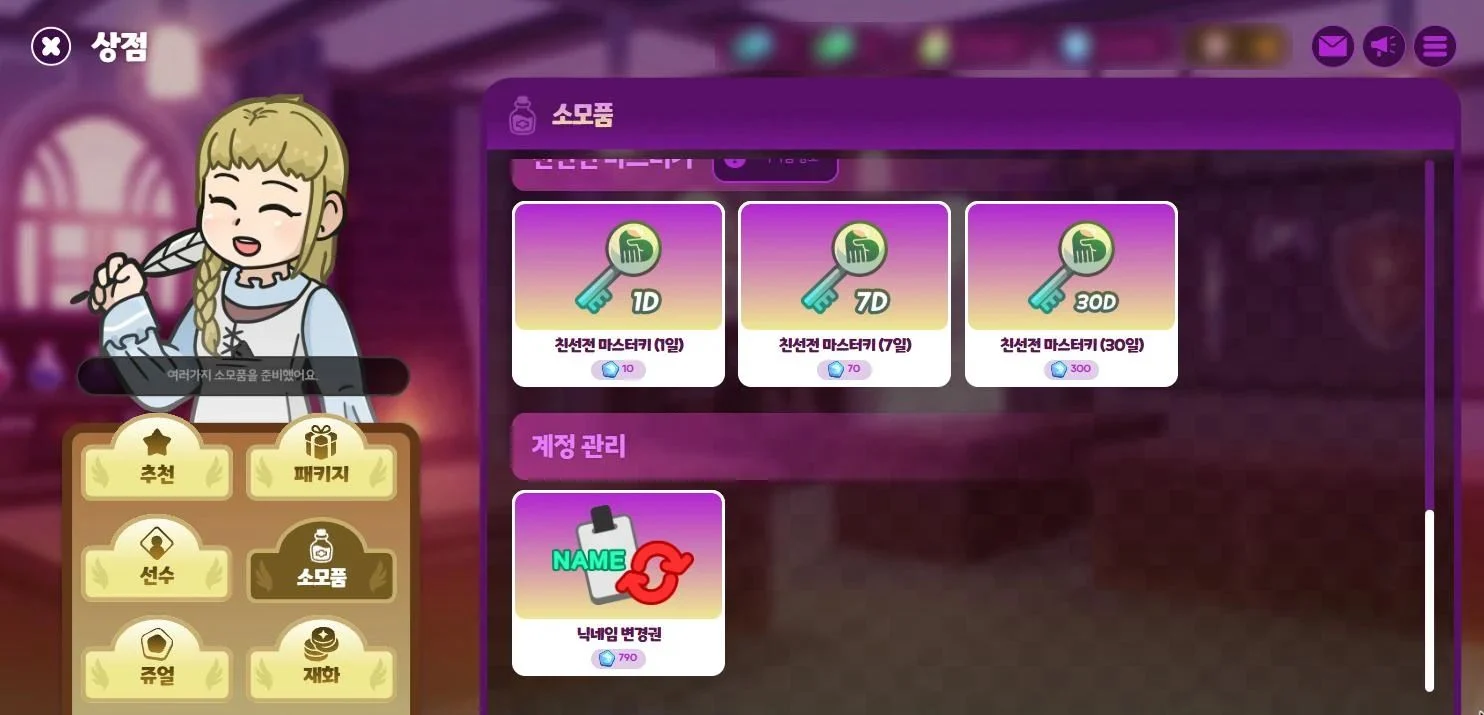
- Nicknames can be 1 to 12 characters long and may contain only Korean, English letters and numbers.
- You can use the same nickname as another Duelist.
- You can't change to your current nickname. If you try, your Nickname Changer won't be used up.
QHow do I raise my Account Level?
You earn Account EXP by claiming a character's Mastery Rank rewards. To check a character's Mastery Rank, select them under 'Duelists' in the main lobby and open 'Mastery'. You can claim the rewards there too.
Using an EXP Scroll from your Bag gives 20 Account EXP per scroll. EXP Scrolls aren't sold in the Shop. You get them from rewards and Mail.
- Event Match unlocks at Account Level 3.
- When you reach Account Level milestones, you can claim Arena Backdrops under 'Milestones' in Quests.
QWhat currencies are there?
There are five currencies in the game.
| Currency | Where to Get It | What It's For |
|---|---|---|
| Powder | Daily and Weekly Quests, Ranked Match Monthly Rewards, Event Match Exchange Shop, Shop (bought with Jewels) | Unlocking Duelists, Trial Tickets, Bond Draw Ingredients, Scenario items, Grit Recharge |
| Jewel | Rewards, Mail, Shop (real-money purchase) | Unlocking Duelists, Powder, Event Medals, Gacha Coins, Wish Gacha Coins, Cosmetics Gacha, Nickname Changers, Friendly Master Keys |
| Wish Gacha Coin | Monthly Wish Gacha Coin Package, Shop (bought with Jewels) | Wish Gacha |
| Event Medal | Winning Event Matches / Shop (bought with Jewels, from Account Level 3) | Event Match Exchange Shop |
| Gacha Coin | Ranked Match Monthly Rewards, Event Match Exchange Shop, Monthly Quests, Shop (bought with Jewels) | Cosmetics Gacha |
To see details of the currency you have, tap 'Your Currency' in the side menu or the currency bar at the top of the screen.
Paid Jewels can only be used where you bought them. Jewels bought on the web are used on the web, and Jewels bought in the Android app are used in the Android app.
QHow do I get new characters?
You start with Devin and Arianna. You can unlock other characters in the following ways.
Buy them from Shop → Duelists tab
| Price (Powder / Jewel) | Character |
|---|---|
| 1,900 / 190 | Lucius |
| 2,900 / 290 | Leon, Aeri, Hilda, Catherine, Irsa, Everett, Sio, Tyche |
| 3,900 / 390 | Crimson, Ophelia, Giselle, Cyily |
| 4,900 / 490 | Nersern, Dana, Tibor, Yongho, Tsart, Manovez, Zesty, Kalila, Natalia, Korva |
- Newly released characters can only be unlocked for 590 Jewels for the first 30 days after release.
- Normal difficulty characters can be purchased from Account Level 2, and Hard difficulty characters from Account Level 4.
Use a Duelist Summon Ticket
- Tap 'Use' on a Duelist Summon Ticket in your Bag to choose and unlock one character you don't have yet. There is no Account Level requirement.
- There are four types of summon tickets: Easy, Normal, Hard, and the 'Duelist Summon Ticket', which works for any difficulty. New characters released less than 30 days ago can't be selected.
You can also try out characters you haven't unlocked yet, one match at a time, with a 'Trial Ticket'.
QWhere can I find my account info?
You can find it under 'Login account info' in the Settings → Account tab. It shows the following:
- Your Game Account and Account Code (copy it with the 'Copy Account Code' button)
- Sign-in methods: your linked Discord, Google and STOVE accounts
- Restriction History
QHow do I log out?
Go to Settings → Account → Danger Zone and tap the 'Log Out' button. You can only log out while you're in the lobby.
QHow do I delete my account?
Go to Settings → Account → Danger Zone and select 'Request Account Deletion'.
- After you read the notice, the 'Agree & Request' button becomes available after 7 seconds.
- Once you submit the request, you will be logged out immediately, and your account will be deleted after 7 days. All your Currency, items and Duelists will be lost permanently and cannot be restored.
- If you change your mind, log in again within 7 days and select 'Cancel Request & Log In'. After canceling, you cannot submit another request for 7 days.
You cannot submit a request in the following cases:
- While you are under Restrictions (All or Competitive)
- While you are in a match
- If you have unused paid Currency, please request a refund at help@metaversus.dev before submitting your deletion request.
QWhat's in the Lobby's 'Events' menu?
This is where all currently running events are gathered. A red dot appears on the button when you have rewards to claim.
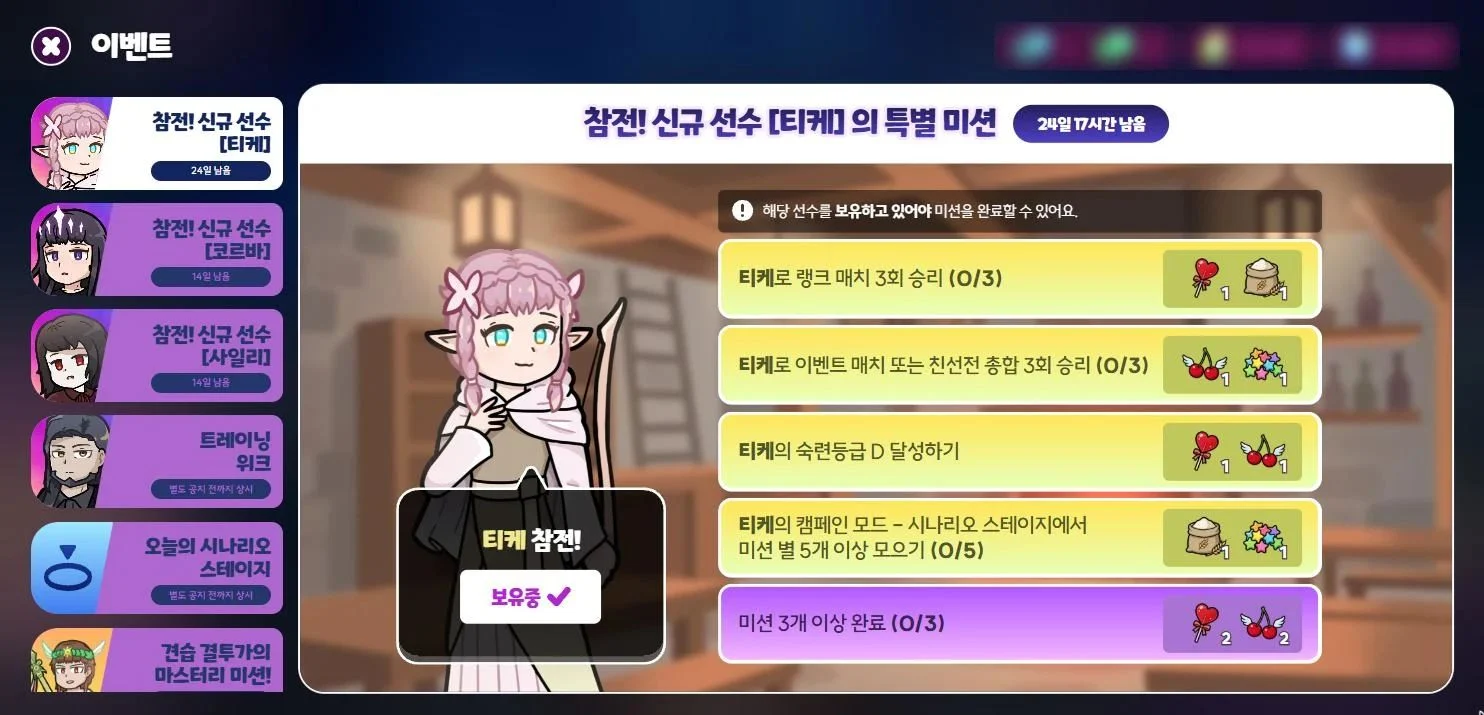
- Today's Scenario Stage: Visible to accounts that have unlocked the campaign Scenario. A new mission appears every day at 5 AM (KST).
- Rookie Duelist Bingo Missions!: Clear first-time goals such as the Tutorial or your first Ranked Match win to earn a reward for each square, plus extra rewards for completing a line.
- Aim for Top Duelist!: Earn rewards the first time you reach a Tier in Ranked Match, or the first time you place near the top of last month's Trophy rankings.
- First Jewel Purchase Bonus: Get a bonus the first time you buy Jewels in the Shop.
- Daily Free Ingredient Draw: Draw Bond ingredients for free once a day. It resets every day at 5 AM (KST).
- Joining the Fight! New Duelist Special Missions: Opens for 30 days after a new Duelist is released. You must unlock that Duelist to clear the missions, and you need to claim the rewards yourself before the event ends (they are not sent by Mail).
- Training Week: Each week a Duelist of the Week is chosen, and weekly missions and a weekly ranking open for that Duelist. Unclaimed rewards disappear when the week changes.
- Apprentice Duelist Mastery Missions: Earn rewards when you collect 2, 3, 5, 7 and 9 Mastery stars. This appears once you complete 'Clear Mastery once' in the Bingo Missions.
QWhat is the Friendly Master Key?
A time-limited item that, while the Private Match Host has it, lets everyone in the room play as any Duelist without a Trial Ticket.
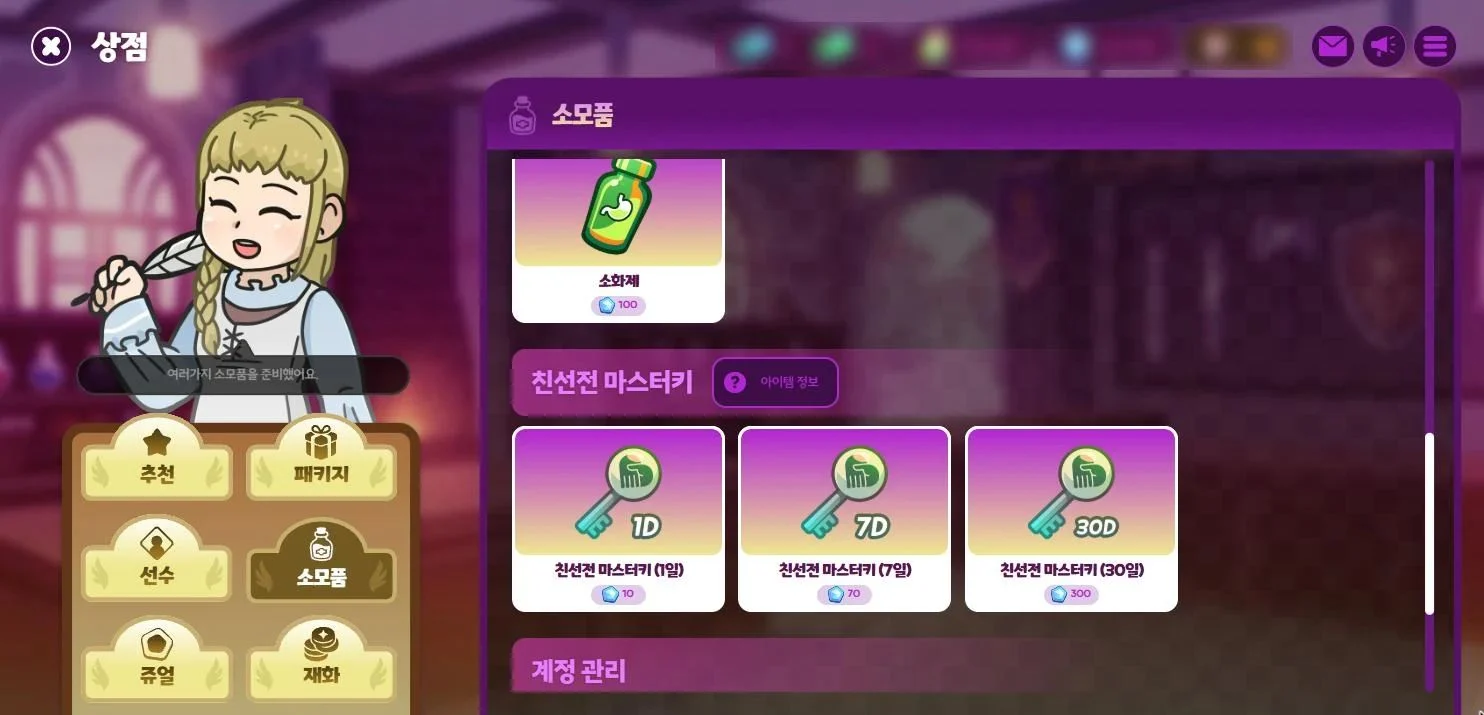
- It costs 10 Jewels for 1 day, 70 Jewels for 7 days, or 300 Jewels for 30 days. If you already have one, the new time is added to your remaining time.
- You can buy it from the Consumable tab in the Shop, or from 'Master Key' at the Private Match entrance.
- This item is not eligible for purchase withdrawal.
QHow does the Cosmetics Gacha work?
Go to 'Gacha' in the main lobby. There are two kinds, Normal Gacha and Wish Gacha. One pull costs 10 Gacha Coins for Normal Gacha or 10 Wish Gacha Coins for Wish Gacha, or 200 Jewels for either.
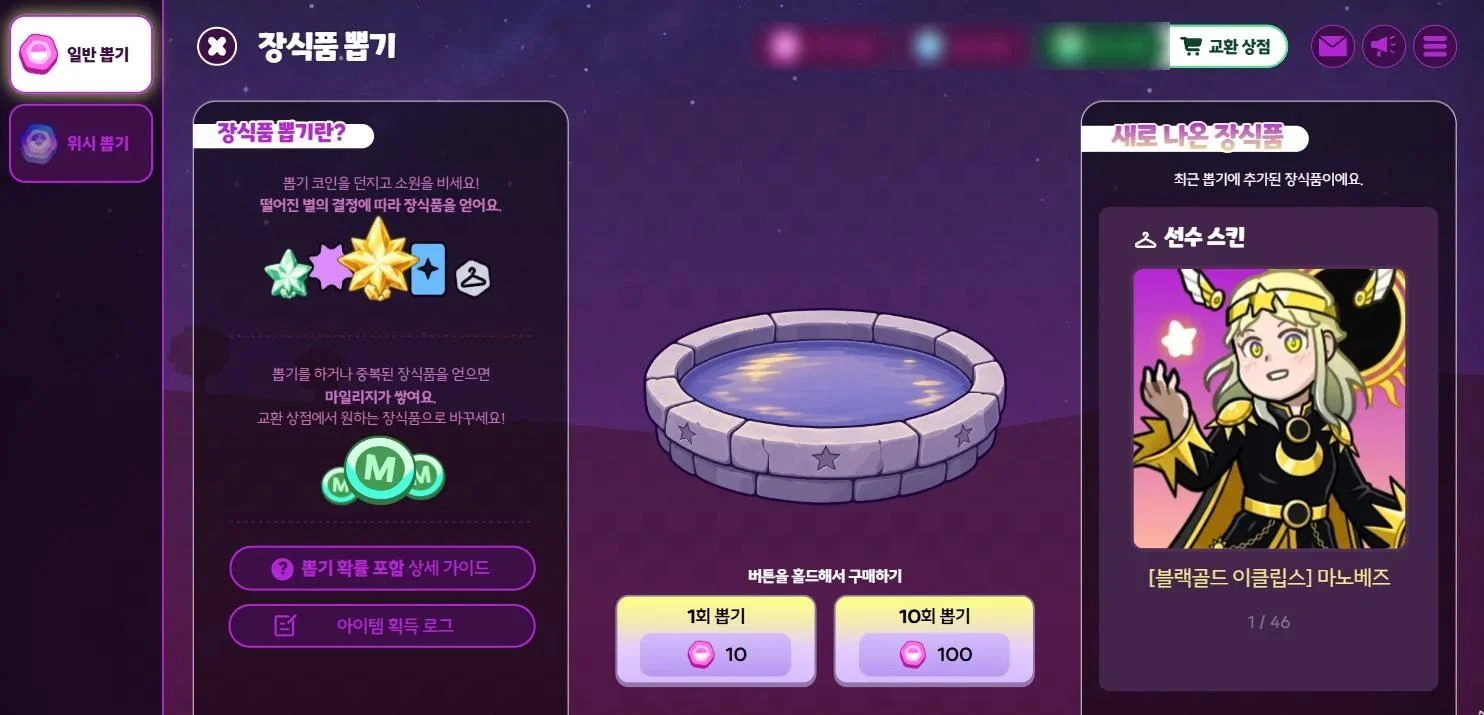
- Pulls can give Duelist Skins, Hit Effects, Card Backs, Emotes and Skin Fragments. You can check the odds for each item in the Probability Item Notice.
- Pick the cosmetics you want in your 'Wish List' to raise your odds of getting them from the Wish Gacha. This doesn't apply to the Normal Gacha.
- Each pull earns you 3 Mileage, and you earn extra when you get a cosmetic you already own. You can trade Mileage for cosmetics in the 'Exchange Shop'.
- Collect 20 Skin Fragments to get 1 Duelist Skin.
QWhen do Quests reset?
You can find them under 'Quests' in the top left of the main lobby.
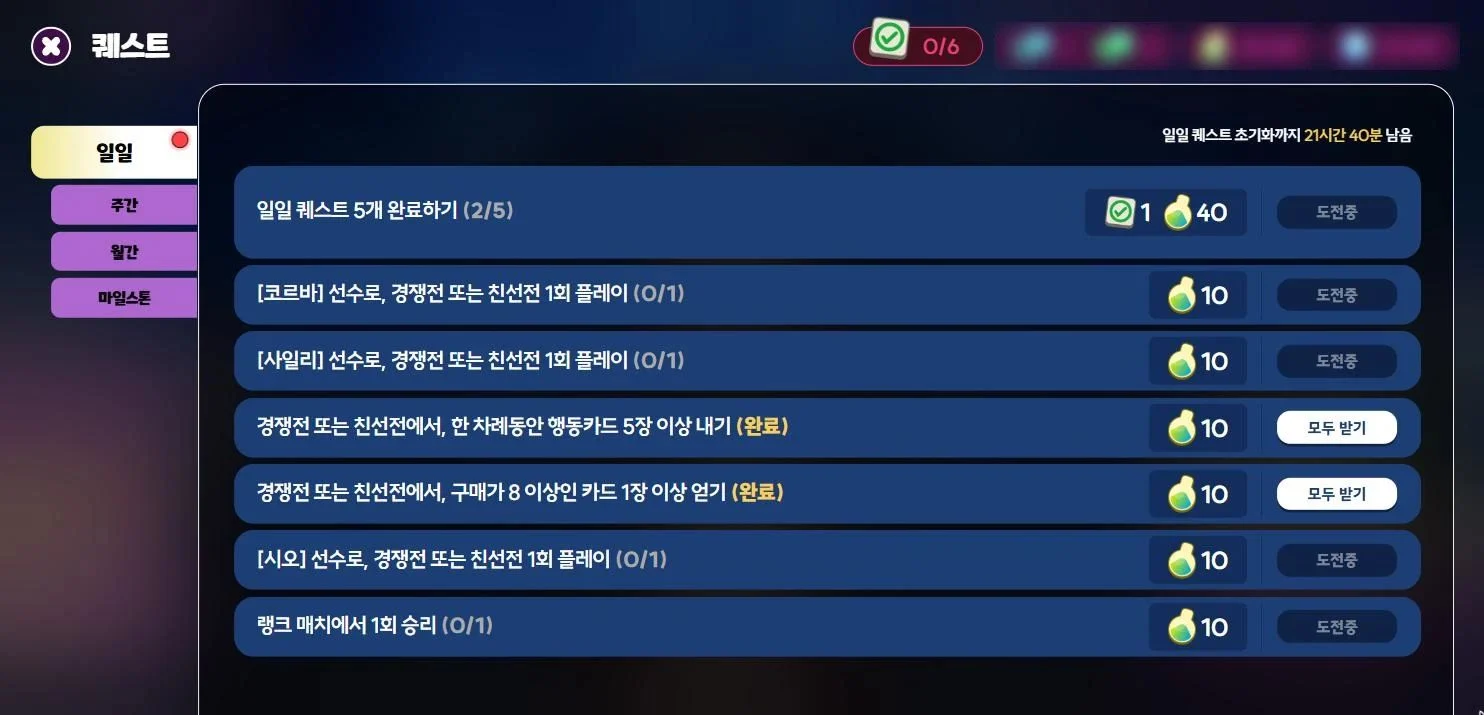
- Daily Quests: 6 new quests appear every day at 00:00 (KST). You get 10 Powder for each one you complete, and completing 5 of them earns you 40 Powder and 1 Stamp.
- Weekly Quests: Collect 2, 4 and 6 Stamps from Daily Quests to receive 300, 500 and 1000 Powder. Resets every Sunday at 00:00.
- Monthly Quests: A new round starts every month. Collect Stamps to level up and earn rewards, up to level 20. Some rewards are free, and some are only for Duelists who bought Monthly Quest+.
- Milestones: Reach certain Account Levels to receive Arena Backdrops.
Any unclaimed rewards are sent to your Mail when quests reset. Mail expires after 1 day for Daily Quests, 3 days for Weekly Quests and 7 days for Monthly Quests, so be sure to claim it in time.